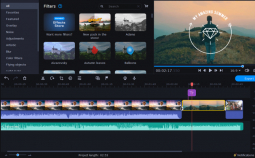

Privacy Policy popup
× Privacy Policy popup
×
 9
 17 Minutes

Movavi vs. Final Cut Pro comes down to one question: do you want a professional editing studio on your Mac, or a finished video by tonight? Final Cut Pro is the stronger pick for professional editing. Movavi Video Editor is the video editor for Mac that lifestyle bloggers, tech reviewers and students can start using right away.
This guide is for Mac users in three spots: you post vlogs, unboxings or travel videos; you review gadgets and devices; or you’ve outgrown iMovie and need something for school projects and tutorials. We put Final Cut Pro features next to Movavi’s in six areas: editing and Mac performance, effects and titles, AI tools, learning curve, and professional work. Where Final Cut Pro wins, we say so.
Final Cut Pro leads on professional editing tools; Movavi Video Editor leads on built-in learning help, one-click AI tools and cross-platform use.
| Criterion | Movavi Video Editor | Final Cut Pro |
| Best for | Beginners and everyday creators: bloggers, tech reviewers, students | Near-professional editors on Mac |
| Timeline | Drag-and-drop timeline with frame-by-frame preview | Magnetic timeline |
| Editing tools | Blade tool, pre-timeline trimming, cropping, speed up to 100x, color presets plus manual controls | Advanced color correction, multicam editing |
| Effects and titles | Hundreds of built-in drag-and-drop effects and titles; optional Movavi Effects subscription with 10,000+ effects | Basic set of effects, expandable with paid third-party packs |
| AI tools | Auto subtitles in 100+ languages, AI video and audio noise removal, silence removal, auto-tracked cropping, motion tracking, AI background removal; no AI credit system | Limited next to AI-first products; Transcript Search, Visual Search and Beat Detection arrived with Apple’s subscription bundle |
| Learning support | Movavi Ideas weekly tutorials, how-to center, tooltips | Third-party courses and Apple documentation; no built-in ideas hub |
| Platforms | Windows and macOS (macOS 12.0 or higher, native support for Apple M1 and newer) | Mac, plus iPad on subscription; macOS 15.6 or later; no Windows version |
| Free option | Yes | 1 month trial |
| Starting price | $19.95/month | One-time purchase of $299 or Apple Creator Studio subscription of $12.99/month |
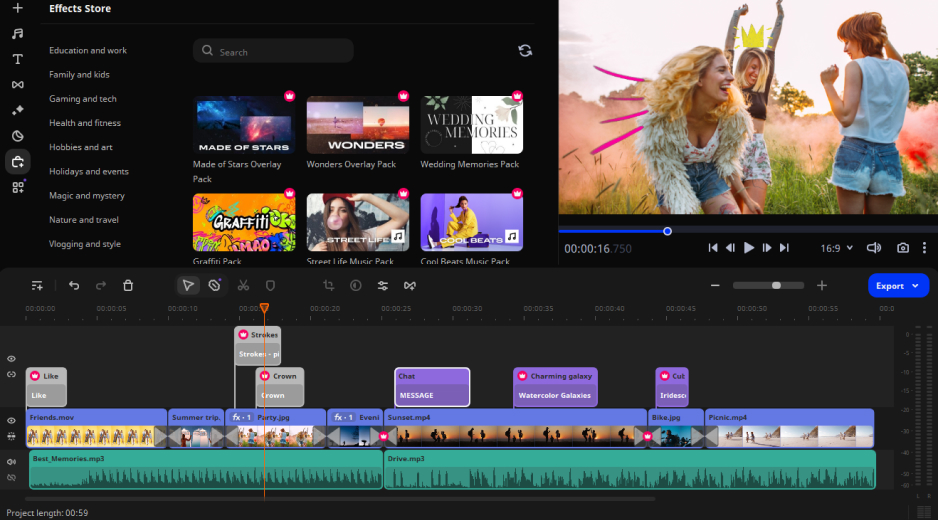
Best for: beginners and everyday creators: lifestyle vloggers, tech reviewers and students.
Picture a daily-routine vlog shot on your MacBook that you want online tonight. Movavi Video Editor is an intuitive video editor with customizable video templates, one-click AI tools, and hundreds of drag-and-drop effects. It’s an easy video editor for Mac, and the Windows and Mac versions are fully equivalent: a desktop app for Windows and macOS. The intuitive interface is perfect for beginners, and hover previews show a clip, effect or transition before it lands on the timeline.
Templates are where the first-try result comes from. Movavi Video Templates is a multi-style library of customizable, pro-looking, modular templates for any kind of video. Each one is a ready-made project split into Blocks, short pre-edited segments of the video such as an intro, a countdown, a quick cut or an animated collage. Editing, music, transitions and text arrive pre-set with the template, and you can keep, change or remove any of them. You replace the placeholders with your own clips and photos, so the finished vlog already has pacing, music and titles on screen.
Key features
Pros
Cons
Price and platforms: Windows and macOS. Movavi Video Editor Free lets you test the tools with a 60-second export cap, no 4K and a watermark; the full version removes all export limits and the watermark. Starting price: $19.95/month.
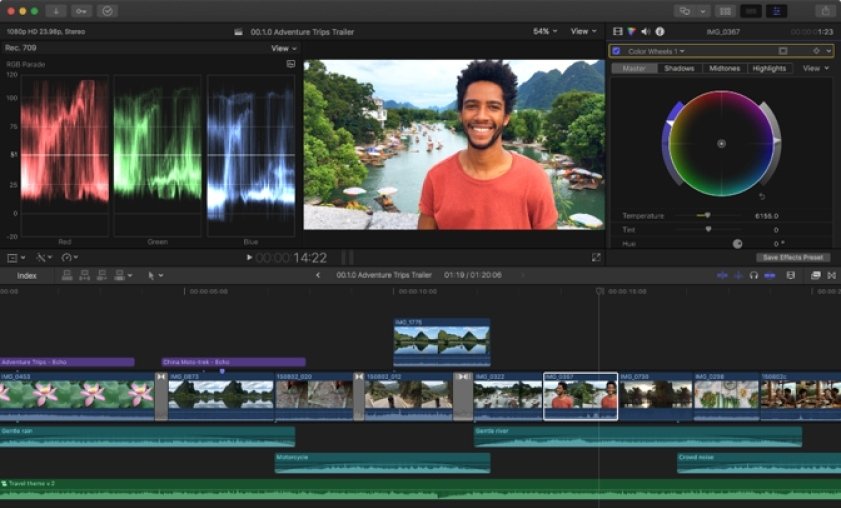
Best for: near-professional editors on Mac, such as iPhone or pro-camera footage for YouTube, and film or commercial editing on Apple hardware.
Key features
Pros
Cons
Price and platforms: Mac and iPad. One-time purchase of $299 or Apple Creator Studio subscription of $12.99/month; 1 month trial.
Final Cut Pro is the faster cutter on a Mac; Movavi Video Editor is quicker to understand.
Final Cut’s magnetic timeline closes gaps for you: trim or move a clip and its neighbors shift to make room. Multicam editing handles footage from several cameras. It’s the fastest way to cut on a Mac, and Apple silicon laptops last long on battery while scrubbing the timeline. Final Cut Pro needs macOS 15.6 or later.
Movavi uses a classic timeline: each clip stays exactly where you drop it. Moving the cursor along the timeline shows the exact frame, so you scrub without guessing. Say your daily-routine vlog runs long. Pre-timeline trimming pulls the best part out of the source file before it enters the project, the Blade tool trims the edges, and the video speed control can squeeze a getting-ready montage into a time-lapse at up to 100x. The editor runs on macOS 12.0 or higher with native support for Apple M1 and newer.
Better for: Final Cut Pro for long, multi-camera projects on a Mac; Movavi for a first vlog you can finish in one sitting.
Movavi gives you more ready-made material inside the editor; Final Cut Pro asks you to add it.
Start with titles. Movavi’s built-in titles take flexible text and formatting settings, and the effects library covers transitions, filters, overlays and stickers for blog, family, work and holiday looks. Mac creators who want more can add the Movavi Effects subscription: 10,000+ effects and 1,500+ music tracks, all previewable on your own video.
Templates cover the bigger job of building the whole video. Template categories include vlogs, business promos, family videos, holidays and reviews, so there’s a starting point for a travel vlog and for a gadget review. Text inside a template can be retyped, restyled and set in another font, so a title reads the way you want it.
Final Cut Pro ships with a basic set of effects, expandable with paid third-party packs. Motion, Apple’s companion app for motion graphics, is a separate application. Some extra material is also reserved for Apple Creator Studio subscribers, even if you bought Final Cut Pro outright.
Better for: Movavi for vloggers who want titles and structure ready on day one; Final Cut Pro for editors who already own, or plan to buy, third-party packs.
Movavi puts one-click AI tools in the editor itself; Final Cut Pro’s AI features are narrower.
Take a gadget review shot at your desk. AI background removal cuts the backdrop out of any video with a person in it, with no green screen, and you drop in any scene you like. AI audio noise removal clears traffic, wind and steady hums in one click. Auto subtitles with Active Word Highlighting recognize more than 100 languages and offer over 60 designs. Silence removal trims pauses automatically, which suits a student’s narrated tutorial. Auto-tracked cropping keeps the speaker centered when you convert a horizontal video to vertical for Shorts, Reels or TikTok. Every one of these is included in the full version, and there’s no AI credit system to count.
Final Cut Pro’s AI features are limited next to AI-first products. The Apple Creator Studio launch added Transcript Search, Visual Search and Beat Detection, which aligns cuts to a music track. The subscription also makes available AI features missing from the one-time versions.
Better for: Movavi for subtitles, clean audio and vertical clips; Final Cut Pro for digging a moment out of hours of footage.
Movavi teaches as you go; Final Cut Pro leaves the teaching to others.
Movavi Ideas is a free tutorial hub with new editing tricks every week. Each idea comes with a step-by-step tutorial that takes under a minute to follow, across vlogs, vertical clips, holidays, family videos and memes. Inside the editor, tooltips and a how-to center cover individual tools. Reviewers report that basic editing is learned quickly.
Searching for Final Cut Pro for beginners? Apple documentation and third-party courses are the route in, and there’s no built-in ideas hub. Final Cut Pro’s audience is near-professional Mac editors, so the learning goes deeper, and so does the time you’ll spend on it.
Better for: Movavi for a first video on a Mac; Final Cut Pro for anyone ready to study.
For professional editing on a Mac, Final Cut Pro is stronger, and we’ll say it plainly.
Advanced color correction, multicam editing and the magnetic timeline give film, commercial and long-form YouTube work room to grow. Movavi’s limits are on its own list: it lacks advanced, detailed controls for a professional workflow. Reviewers who edit more seriously mention wanting deeper color correction and finer audio controls.
If your goal is a career in editing, start with Final Cut Pro. If you edit vlogs, reviews or class projects and want to spend the time on the video itself, Movavi covers the editing basics without the extra weight.
Better for: Final Cut Pro for professional work on Apple hardware; Movavi for everyday creators.
Your first video on a Mac. You filmed a daily routine and want it online tonight. Import the clips, choose a template from the vlogs category, and replace each placeholder in the Blocks with your own footage. Music, transitions and text are already in place, so the first cut already looks planned. Pick: Movavi.
Moving up from iMovie. iMovie is Apple’s free, simple editor, preinstalled on its devices. A student making a tutorial or a school project presentation gets a broader effects library, customizable templates and AI tools. Silence removal tightens the narration and auto subtitles add captions. Pick: Movavi, as your iMovie alternative.
A vlog with titles on a template. A travel vlogger or gadget reviewer can start from a title template, retype the default text in each Block and keep the template’s pre-set music or swap it. AI background removal covers an unboxing shot. Pick: Movavi.
Professional editing. iPhone or pro-camera footage for YouTube, a commercial, a multi-camera shoot: this is Final Cut Pro territory. Pick: Final Cut Pro.
Movavi Video Editor earns praise for versatile editing features and an intuitive workflow; cost draws the most complaints. Final Cut Pro’s scores come from small samples.
| Product | Source | Rating | Reviews | What reviewers mention |
| Movavi Video Editor | Capterra | 4.8 | 1,135 | 97% positive on editing features, 98% positive on workflow; 48% of 198 pricing-related reviews negative |
| Final Cut Pro | TrustRadius | 8.9 out of 10 | 10 | Disk space, library re-downloads after updates, Motion sold separately |
| Final Cut Pro | Trustpilot | 1.3 out of 5 | 24 | Scores as of August 2026 |
The Movavi pricing complaints center on subscriptions and upsells. One reviewer put it plainly:
“Far too expensive for the casual user” Paul T., Movavi Video Editor reviewer
Feedback from Reddit and review sites collected for Movavi echoes it: a strict export limit in the free version, add-on subscriptions on top of the main license, and activation that can confuse because the program and add-on packs are licensed separately.
Final Cut Pro’s reviewers write about storage more than anything else:
“It uses lots of space” Final Cut Pro reviewer
Pick Movavi Video Editor if you’re a lifestyle blogger, tech reviewer or student who wants a finished video fast, with templates, titles and AI tools in one place and the option to work on Windows or macOS. It’s the answer if you’re looking for a Final Cut Pro alternative that starts simple.
Pick Final Cut Pro if you edit professionally on a Mac, work with several cameras or want advanced color correction, and don’t mind studying to get there.
Not sure yet? Download Movavi Video Editor Free, open one Movavi Ideas tutorial and fill a template’s Blocks with your own clips. One evening shows you how far a Block-based vlog goes.
Which is easier: Final Cut Pro or Movavi?
Movavi. It runs on a classic timeline and ships with tooltips, a how-to center and weekly Movavi Ideas tutorials. Final Cut Pro’s magnetic timeline is quick once learned, and learning it relies on third-party courses and Apple documentation.
Does Movavi for Mac have templates?
Yes. Movavi for Mac includes the same Movavi Video Templates as the Windows version, built from Blocks you can reorder, add or delete. Several are included in the full version; the whole library needs a separate subscription.
What is a good iMovie alternative on Mac?
Movavi Video Editor suits people who outgrew iMovie: more effects and music, customizable templates and one-click AI tools. Final Cut Pro is the next step if you want professional tools.
Does Movavi run on Apple silicon?
Yes. It supports macOS 12.0 or higher, with native support for Apple M1 and newer.
Is Final Cut Pro available on Windows?
No. It runs on Mac, plus iPad on subscription.